# Working with Stored Procedures
**URL:** https://community.omni.co/t/working-with-stored-procedures/329
**Category:** Patterns
**Created:** [May 16, 2025, 8:52pm UTC](https://community.omni.co/t/working-with-stored-procedures/329 "2025-05-16T20:52:21Z")
**Posts on this page:** 1
**Page:** 1
### Author:  [@adrienb](https://community.omni.co/u/adrienb)
#### Post date: [May 16, 2025, 8:52pm UTC](https://community.omni.co/t/working-with-stored-procedures/329/1 "2025-05-16T20:52:21Z")
Stored procedures are a common way to make SQL logic reusable at the database level by predefining a set of instructions. They may provide performance, security, and traceability benefits as well as enabling code consolidation. This guide assumes user familiarity with stored procedures - for a helpful walkthrough, refer to this [blog post](https://select.dev/posts/snowflake-stored-procedures). **In general, Omni will work with stored procedures, allowing you to define, edit, and run these procedures from within the BI layer.** However, there are several nuances to be aware of.
### Permissions
To access stored procedures from Omni, the `omni_role` in the database must be granted access to the procedure. Note that the `omni_role` and `omni_user` will have been created in the initial database connection process documented [here](https://docs.omni.co/docs/connections/database/snowflake#step-1). The syntax is as follows:
`GRANT USAGE ON PROCEDURE ..() TO ROLE `
### Requirements
The recommended approach to trigger a stored procedure depends on the structure of said procedure, as well as the use case at hand.
First, we should understand if the procedure includes any DML operations. Data Manipulation Language (DML) is a broader term for SQL operations that allow manipulating the contents of a table, view, or stored procedure. This includes the common `SELECT` command as well as `INSERT`, `UPDATE`, `DELETE`, and `MERGE`. This is different from Data Definition Language (DDL), which focuses on defining the structure of the database itself with commands such as `CREATE`, `ALTER`, `DROP`, `TRUNCATE`, and `RENAME`. The limitation here exists because Snowflake prohibits any side-effecting operations (like DML) inside a TABLE() function call, which is one of the ways Omni can run a procedure.
Next, we should determine whether the outputs of the procedure need to be requeriable in Omni. In other words, will Omni simply be an interface through which a procedure gets triggered or will there be additional data manipulation downstream of the procedure call?
With these questions answered, let’s look at the options.
### CALL vs SELECT
**Option 1 - Use CALL for any procedures involving DML and/or simple outputs**
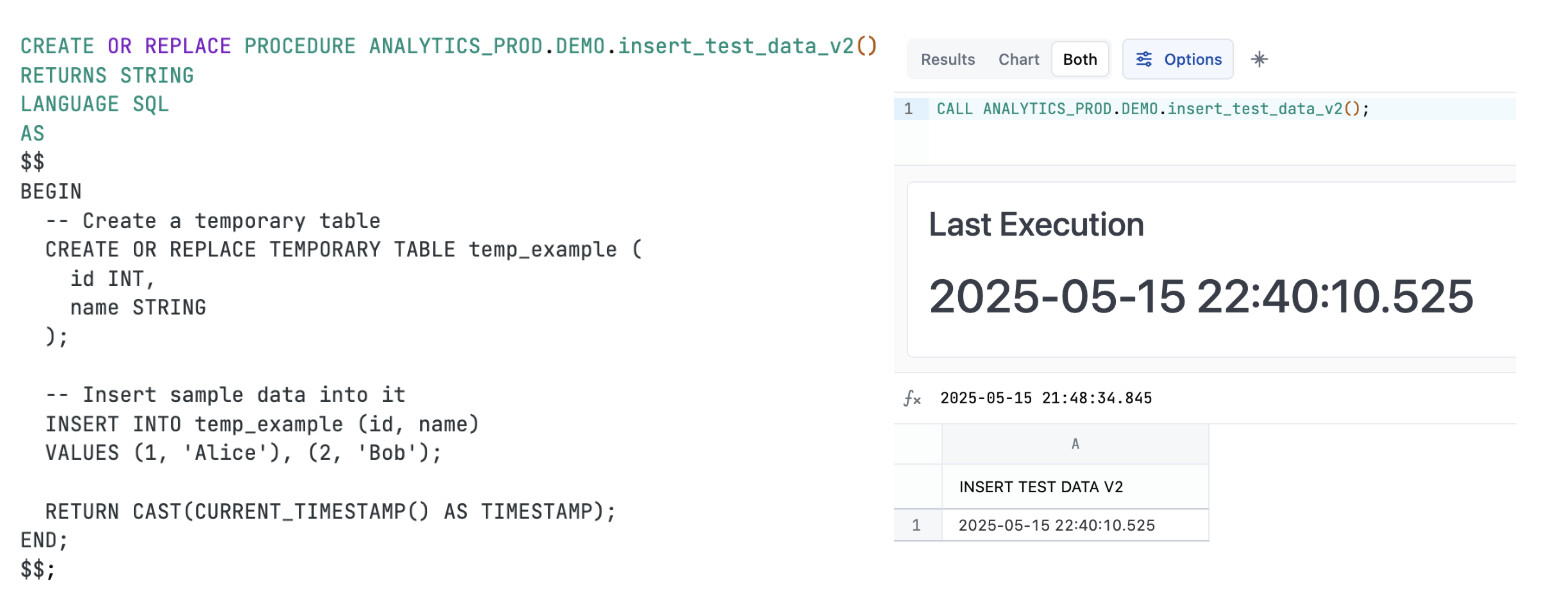
Broadly speaking, you may run any stored procedure from an Omni SQL tab by using this CALL syntax:
`CALL ..()`
If the procedure includes a DML operation, this is the **ONLY** syntax that will work. This is also the most straightforward syntax, making it easy to use when the procedure has no output or returns basic results like a success message or a timestamp of execution. Any such output behaves like a normal SQL-tab query result and can be visualized as such. The example below includes a DML operation and visualizes the returned timestamp using a KPI tile.
**Option 2 - Use SELECT for a procedure without DML to requery results**
Omni can only select the results of a procedure that outputs a data table without additional manipulation (i.e. DML). The syntax is as follows:
`SELECT * FROM TABLE (..())`
Querying a stored procedure this way unlocks the full Omni functionality, including using parameters, templated filters, dashboard linking, etc. Below is an example where the SQL tab was saved as a query view, making the fields queryable just like any other table in Omni.

### Cheat Sheet for Quick Reference

# Advanced Workflows
### Parametrizing a Stored Procedure Execution
Any stored procedure, whether triggered with a CALL or SELECT statement, can be parametrized using standard filters or templated filters. Below is an example using filter syntax, where the filter can be put on a dashboard so that the procedure execution is responsive to user selection. This works with saved query views as well.

### “Hiding” a CALL statement on the dashboard
Once a workbook has been published as a dashboard, a query will only run if the associated tile is visible on said dashboard. You may have use cases where a procedure needs to be called but you don’t want the output to be user facing - in that case, consider “hiding” the procedure by making its visualization a static markdown tile, or having the procedure return a simple success message or execution timestamp that can be shown on the dashboard.
### Updating a Stored Procedure from within Omni
If it is helpful to keep everything in one place, you can directly create and edit stored procedures from an Omni SQL tab! Simply make sure the `omni_user` has been granted write back access to the database as well as usage access to any existing procedures you want to modify.
# Common Troubleshooting
- _Everything looks fine but I don’t see the results changing_
- Try running the query without cache
- _Error - Invalid statement type_
- You may be trying to use SELECT for a procedure that includes a DML operation. You’ll need to use CALL or remove DML statements from the procedure
- _Error - Insufficient privileges_
- Make sure you grant usage to the procedure to the Omni role in Snowflake
- _Error - SQL Compilation_
- You may be trying to save a procedure as a query view while using CALL, as a reminder only procedures that can be wrapped with a SELECT statement can be save as query views (i.e. must not have a DML operation)